







Beyond the Grid: Why Modern Maintenance Teams Are Finally Ditching Spreadsheets for CMMS

By Gurpreet Kaur
Published: October 27, 2026
Main Facts: The End of an Era for Manual Tracking
For decades, spreadsheets have served as the unsung heroes of facility and maintenance operations. Inexpensive, universally accessible, and infinitely flexible out of the box, tools like Microsoft Excel and Google Sheets have long been the default "go-to" for logging work orders, organizing asset registers, and mapping out repair histories. For small-scale operations with limited equipment, they offer a low-friction entry point to organization.

However, the industrial landscape is shifting rapidly. As facilities expand, labor markets tighten, and asset complexity increases, the humble spreadsheet is reaching a breaking point. Modern maintenance teams are facing an influx of operational data that manual systems simply cannot handle.
The transition from static spreadsheets to a dynamic Computerized Maintenance Management System (CMMS) is no longer just a luxury for enterprise-level manufacturers—it has become a foundational survival strategy. By centralizing work orders, equipment histories, preventive maintenance (PM) schedules, and inventory tracking into a single digital ecosystem, a CMMS transforms maintenance departments from reactive firefighters into proactive reliability leaders.
Chronology: The Lifecycle of a Spreadsheet-Dependent Operation
To understand why maintenance teams inevitably outgrow spreadsheets, one must examine the typical lifecycle of an expanding operation relying on manual workflows.
Phase 1: Inception and Simplicity
At the launch of a small operation or single-site facility, spreadsheets shine. A maintenance manager sets up columns for equipment names, installation dates, and basic repair notes. Work requests arrive via direct phone calls or sticky notes, and the manager manually inputs them into the master file. Everything is transparent because the volume is low.
Phase 2: The Growth Bottleneck
As the business scales—adding new production lines, acquiring secondary facilities, or hiring more technicians—the volume of data explodes. Work requests now stream in through a chaotic mix of emails, instant messages, and hallway conversations.
- The Breakdown: Spreadsheets lack automated triggers. Technicians are not automatically notified of new assignments, leading to missed requests.
- The Result: Maintenance backlogs swell, response times become erratic, and managers spend hours playing detective across multiple disconnected files just to figure out who is fixing what.
Phase 3: The Breaking Point and Transition
Eventually, a critical piece of equipment fails unexpectedly because a routine preventive maintenance check was buried on row 4,200 of an unmonitored spreadsheet tab. Faced with soaring downtime costs and incomplete asset histories, leadership realizes that manual tracking is actively hindering growth. This realization triggers the shift toward a dedicated CMMS implementation.

Supporting Data: 7 Clear Signs Your Operation Has Outgrown Spreadsheets
Recognizing the tipping point before a catastrophic failure occurs is vital. Industry data and operational audits consistently point to seven red flags indicating that an organization has completely outgrown manual spreadsheet tracking:
- Frequently Missed Work Requests: Maintenance requests submitted through ad-hoc emails or verbal chats slip through the cracks without a unified intake portal.
- Overdue Preventive Maintenance: Routine servicing and safety inspections are chronically missed because spreadsheet-based reminders rely entirely on human memory.
- Ambiguous Technician Assignments: Supervisors waste valuable hours each day clarifying task scopes, tracking down project updates, and manually relaying instructions.
- Fragmented Repair Histories: Equipment data is siloed across separate files, making it nearly impossible to spot recurring failure patterns or accurately calculate Total Cost of Ownership (TCO).
- Inventory Blind Spots: Teams struggle to monitor spare parts usage, leading to unexpected stockouts of critical components or bloated inventories of obsolete parts.
- Exhaustive Manual Reporting: Compiling monthly metrics on downtime, labor hours, and completed work orders requires hours of tedious copy-pasting and formula troubleshooting.
- Multi-Facility Disconnect: Organizations managing multiple locations find it impossible to enforce standardized procedures or compare cross-site performance using localized spreadsheets.
Official Perspectives and Comparative Analysis
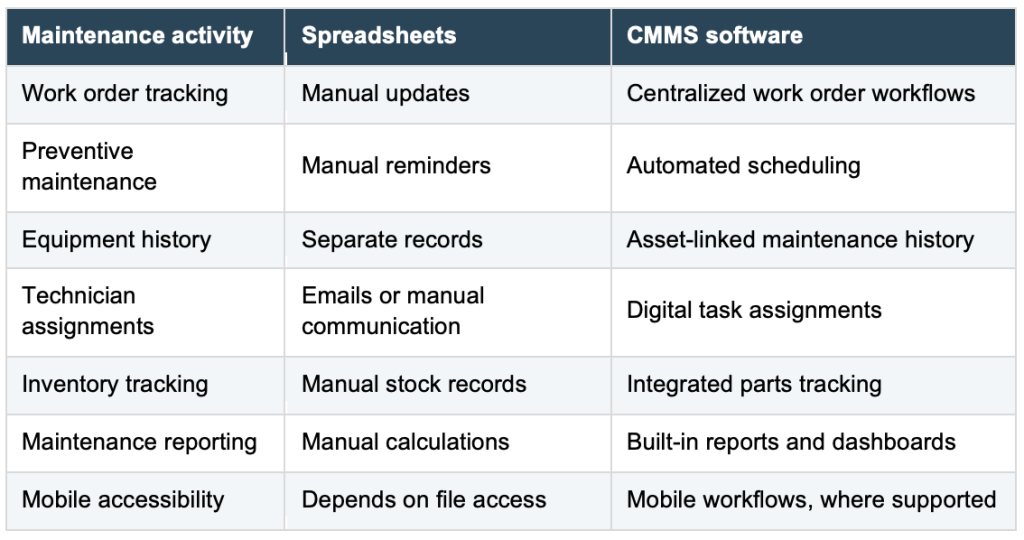
Unlike static documentation tools, a modern CMMS is architected specifically to support operational workflows. When a technician receives an assignment on their mobile device, reviews asset schematics, logs labor hours, updates parts used, and closes out the ticket, that data instantly populates a centralized dashboard.

| Feature / Capability | Spreadsheets (Excel/Google Sheets) | Computerized Maintenance Management System (CMMS) |
|---|---|---|
| Work Order Tracking | Manual data entry; no real-time updates. | Automated routing, mobile alerts, and live status tracking. |
| Preventive Maintenance | Relies on manual calendar reminders and human vigilance. | Automated triggers based on calendar intervals, run-hours, or meter readings. |
| Asset History | Scattered across multiple tabs, files, and folders. | Centralized repository linked directly to individual asset profiles. |
| Inventory Management | Prone to discrepancies; requires separate tracking sheets. | Integrated spare parts tracking with automated reorder thresholds. |
| Reporting & Analytics | Requires manual pivot tables and custom formula building. | One-click generation of KPIs, MTTR, downtime, and cost reports. |
The core advantage of adopting a CMMS is not just trading one software for another; it is establishing a single source of truth that drives accountability and data integrity across the entire organization.
Preparing for the Transition: A Step-by-Step Implementation Blueprint
Migrating from spreadsheets to a CMMS requires meticulous preparation long before software installation day. Industry best practices suggest following a phased approach:

Step 1: Audit and Clean Existing Data
Before importing anything into a new system, compile all existing maintenance spreadsheets—asset registers, PM schedules, work order logs, and parts lists. Purge duplicate entries, correct outdated equipment names, and fill in missing fields. Garbage in equals garbage out; cleaning your data beforehand ensures a smooth migration.
Step 2: Build a Comprehensive Asset Inventory
An accurate asset register forms the bedrock of reliable maintenance management. Every piece of equipment should be cataloged with its make, model, serial number, location, critical rating, and associated documentation.

Step 3: Prioritize Critical Workflows
Not all equipment carries equal operational weight. Identify mission-critical assets, regulatory compliance tasks, and high-frequency failure points. Focus your initial CMMS setup on these high-impact areas to secure early wins and demonstrate ROI to leadership.
Step-by-Step Implementation Guide
- Software Selection: Choose a CMMS tailored to your daily operational needs rather than getting distracted by superfluous bells and whistles. Emphasize user-friendliness, mobile accessibility, and robust customer support.
- Data Migration: Import your validated asset registers and PM schedules into the system, starting with a single pilot department or facility to iron out kinks.
- Configure Workflows: Establish clear, standardized procedures for how maintenance requests are submitted, prioritized, assigned, and signed off.
- Set Up Preventive Maintenance: Program recurring tasks using manufacturer guidelines and operational hours, replacing manual calendar reminders with automated triggers.
- Train with Real Scenarios: Conduct hands-on training sessions using everyday maintenance tasks rather than abstract walkthroughs. Empower technicians to practice closing tickets in a live environment.
- Run a Pilot Program: Test the software with a small cohort of technicians. Gather their feedback, refine the user interface, and adjust workflows before rolling the platform out organization-wide.
- Scale Gradually: Once the pilot team is comfortable, systematically onboard additional departments, facilities, and assets.
Common Pitfalls to Avoid
- Migrating Dirty Data: Dumping disorganized, error-ridden spreadsheets straight into a new CMMS will immediately compromise user trust in the platform.
- Feature Overload: Trying to activate every advanced function (predictive IoT sensors, complex accounting integrations, custom APIs) on day one overwhelms staff. Start with the core triad: work orders, assets, and PMs.
- Neglecting Technician Feedback: Because technicians are the primary daily users of the software, ignoring their usability complaints will lead to low adoption rates and shadow record-keeping.
- Failing to Assign Ownership: Designate a dedicated "CMMS champion" responsible for maintaining data quality, monitoring user adoption, and coordinating ongoing training.
Implications: Measuring Long-Term Success
Implementing a CMMS opens the door to tracking key performance indicators (KPIs) that directly influence corporate profitability and asset health. Once transitioned, organizations should routinely monitor:

- Work Order Completion Rate: The percentage of tasks finished within a designated timeframe.
- Preventive Maintenance Compliance (PMC): The degree to which scheduled servicing is executed on schedule.
- Mean Time to Repair (MTTR): The average duration required to restore a failed asset to operational status.
- Overall Equipment Downtime: Total hours lost due to unscheduled breakdowns.
- Technician Adoption Rate: A metric tracking how consistently staff utilize the mobile application to document labor and parts.
Conclusion: Building a Resilient Maintenance Culture
The migration from spreadsheets to a CMMS is far more than a simple software upgrade—it represents a cultural shift toward structured, data-driven reliability. While spreadsheets will always have their place in casual data organization, growing industrial and facilities teams require robust digital frameworks to handle the complexities of modern operations.
By prioritizing clean data, focusing on operational needs, and fostering gradual user adoption, maintenance professionals can step away from the endless cycle of spreadsheet firefighting. The ultimate objective is clear: equipping maintenance teams with the visibility, processes, and tools required to maximize asset uptime and drive continuous operational excellence.